
Online Safety Newsletter for the month
Dear Parents/Carers,
As part of our ongoing commitment to online safety, we want to provide you with important information about WhatApp. While WhatsApp can – and is – used sensibly and appropriately by many users, there are some aspects of WhatsApp that pose a risk to children. The minimum age to hold a WhatsApp account is 13 years old, so it is not able to be used by some of our students.
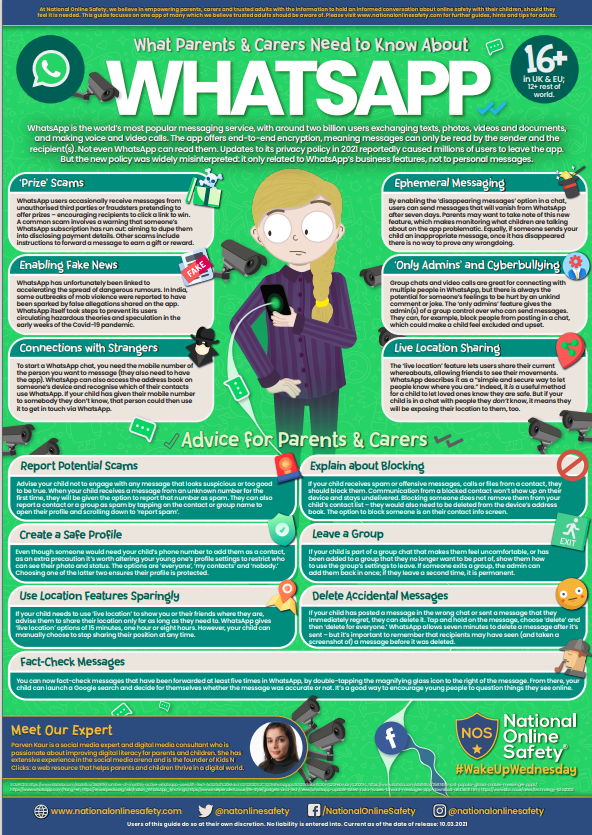
What is WhatsApp?
WhatsApp is a global messaging platform for smartphones. It uses the internet rather than phone signal to connect users and allow them to send text messages, photos, videos and voice notes to anyone in the world that they are connected with. It also offers the ability to make calls, video calls and host group chats.
Risks Associated with Whatsapp
- Unwanted Contact
To contact somebody on WhatsApp, all you need is their phone number. This means that your child could be at risk of receiving unwanted messages or calls from others.
- Pressure to respond
Features that allow other users to see when your child is online, if they have read a message or when they were last active on the app could make your child feel pressured to respond even when they don’t want to.
- Location Sharing
The live location feature means that your child could reveal their current location to others. This feature can be used in groups as well as individual chats, so your child could reveal this information to people that they don’t know if they are in the same group.
- Inappropriate Content
WhatsApp messages are end-to-end encrypted, which means that the content cannot be monitored. This means that your child could see or hear harmful or upsetting content.
- Cyberbullying
WhatsApp groups can be controlled by an ‘admin’, who can change settings, such as the name of the group, who is allowed to send messages, as well as being able to invite and remove people from the chat. This could lead to children feeling left out or being deliberately excluded or removed from groups.
- Oversharing
Privacy features, such as disappearing and ‘view once’ messages, might mean that your child feels safe to reveal private information or images. However, there is always a risk that an unintended person might see what they have sent, for example if they are with the recipient.
- Group Chats
Group chats have the ability to add people to groups. People can be added without their permission and, due to the nature of WhatsApp groups – there could be people in there the user doesn’t know. Groups could be made up of other children, adults, men, women, people with good intentions and people with bad intentions.
Tips to Keep Your Child Safe on WhatsApp
Get to know privacy settings
There are four main settings that you can use to help your child control who can see their information:
- Everyone – allows all users to see your profile photo, about or status.
- My contacts – only allows people from your phone contacts to see your profile photo, about, status, last seen and online.
- My contacts except… – allows you to exclude certain people in your phone contacts from seeing your information.
- Nobody – doesn’t allow anyone to see your information.
The default setting on WhatsApp is ‘everyone’ but you can help your child to set their privacy controls by clicking the ‘settings’ cog and selecting ‘privacy’. Here you can select each type of information and change it to the setting that you want.
To prevent children being added to groups by people they don’t know, we recommend changing the group settings to ‘My contacts except’ and using the tick icon to select all contacts. This option means only your child’s phone contacts, except those you exclude, can add your child to groups. But by selecting all contacts, it means that nobody can add your child to a group chat without first sending them an invitation.
In the same section, you can also switch off ‘read receipts’, which means other people cannot see when you have read their message. This might help if your child is feeling under pressure to respond to messages.
Make use of safety features
Show your child how to block and report other users of the app or inappropriate content. For information on how to block or report on WhatsApp visit: How to block and report contacts | WhatsApp Help Center.
Talk about sharing
Talk to your child regularly about what they should and shouldn’t share with others on WhatsApp. You can read more about this here: Social media | NSPCC
Remind your child that, even if they think what they are sending will stay private, others might save, forward or screenshot it. Talk to them about making sure others are comfortable with what they are sending and let them know they can come to you if they are worried about something they have shared on the app.
Set rules about location sharing
Decide with your child if it is appropriate for them to share their location with others and who they are allowed to share it with. You can disable location permissions by going into your device settings and switching off location services for WhatsApp.
Further Resources
ThinkUKnow: www.thinkuknow.co.uk
NSPCC Online Safety: www.nspcc.org.uk/keeping-children-safe/online-safety/
WhatsApp Help Centre: https://faq.whatsapp.com/
By staying informed and proactive, we can work together to ensure that your child enjoys WhatsApp safely and responsibly.
If you have any questions or concerns, please do not hesitate to contact us.
Best regards
Duncan Bradshaw and Tom Allen
Online Safety Lead
CEOP Ambassador